
Trace Helps You Make Informed Disk Management Decisions
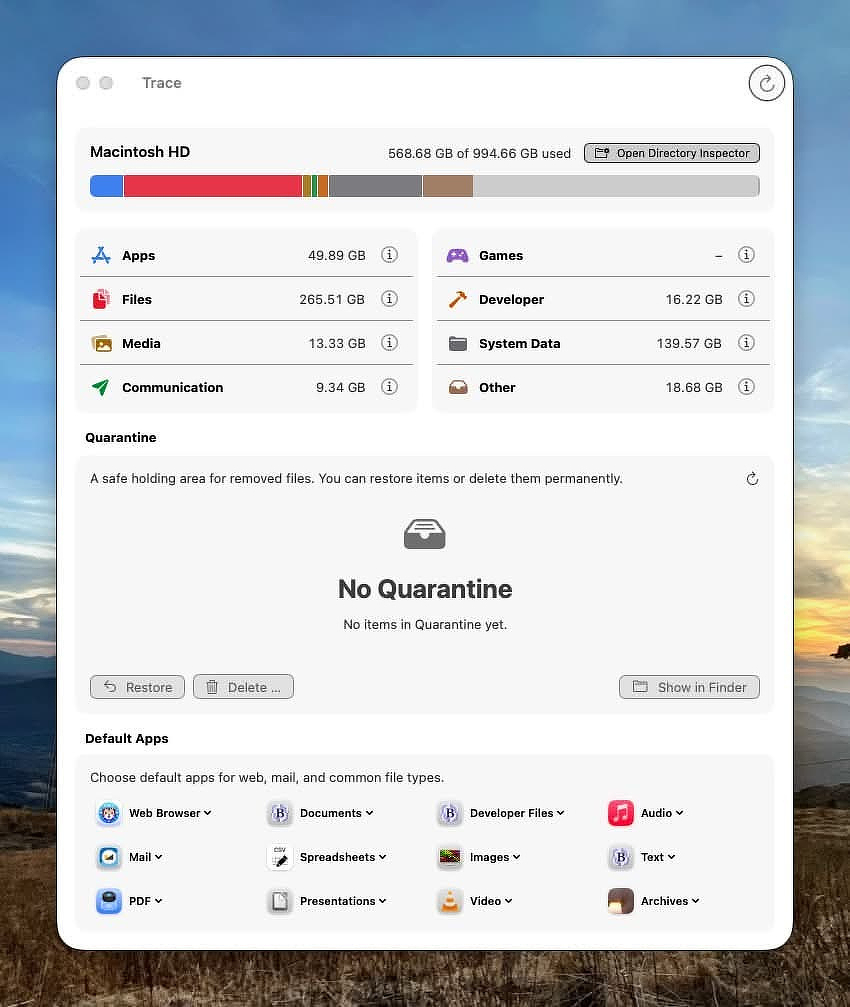
Unless you’re seeing severely degraded performance during large writes, or macOS is actively warning you that you’re out of space, you can usually let the system manage storage. It does a solid job.
If you do need to step in and make selective deletions, a newer app from Switzerland—Trace—offers genuinely informed assistance.
When it was introduced on Reddit, some commenters dismissed it as yet another vibe-coded “optimizer.” That assumption doesn’t hold up. Trace has thorough documentation and a deep feature set. It’s not a one-click wrecking ball, a “system optimizer,” or a fake RAM cleaner. It’s a disk analysis tool built for people who want to understand what’s actually taking up space—usually user-created files—and make deliberate decisions.
Every removal option is clearly classified as Safe, Questionable, or Not Safe. That framing alone separates it from most consumer cleanup tools.
One of the most practical features is its quarantine system. Instead of deleting immediately, you can move files into quarantine and run your Mac normally to confirm nothing breaks. If everything checks out, send them to the Trash. If not, restore them to their original location with a click. That’s how deletion workflows should work.
Categories Evaluated
Trace organizes findings into categories:
Apps
Shows the app’s bundle size plus associated support files in ~/Library. The built-in App Inspector identifies removable caches and estimates reclaimable space if you reset them. There’s also an uninstaller that goes beyond simply dragging to Trash.
Files
Lists user home directory files by size. On my system, the biggest offenders were local LLM models, iPhone videos, and illustrated books in my Calibre library. The directory inspector lets you drill down into any folder and its subfolders for precise analysis.
Media
Reports the size of Apple media libraries (Music, Photos, TV, etc.). Useful for spotting duplicate libraries or old “Previous iTunes Libraries” folders that quietly accumulate over the years.
Communication
Breaks down Mail and Messages storage.
Games
Separates games from standard apps and exposes associated mods, caches, and saved games.
Developer Tools
Analyzes Xcode data, Homebrew, Rust, Git, Python environments, and more. If you’ve been experimenting with toolchains, this view is illuminating.
System Data
Breaks down space used inside ~/Library and other system folders, including removable caches. On my M2 MacBook Air, Apple Intelligence alone accounted for 11GB.
Other
If you’ve been experimenting with local AI tools (Open Claw, Ollama, Parakeet, Osaurus, etc.), this category helps identify where those model files actually live and how much space they’re consuming.
Trace Agent
Trace includes an optional background process called TraceAgent. When you trash an app, TraceAgent monitors the event and later suggests related files that may also be removable.
Important details:
- No auto-delete: TraceAgent never deletes anything on its own.
- Transparent suggestions: Recommendations are based on documented attributions and vendor profiles.
- Optional: You can enable or disable TraceAgent at any time.
- Demo-friendly: It’s fully usable in the free demo.
This strikes a reasonable balance between helpful automation and user control.
Default App Selector
An unexpected bonus feature is a consolidated default app selector. It centralizes system defaults for:
- Browser
- Documents
- Spreadsheets
- Presentations
- Developer files
- Images
- Video
- Audio
- Archives
It’s a small thing, but having this in one interface is practical.
If you download the trial (which I recommend), read through the documentation and the FAQ. This is not a “click and hope” utility. It’s built for users who want context.
Trace requires Full Disk Access. It contains no telemetry and has no cloud dependencies. The developer has stated that if development ever stops, the code will be released as open source.
It’s not available in the Mac App Store due to sandboxing limitations. Licenses are transferable and not locked to a single machine. Pricing is straightforward:
- Lifetime license: $29 (includes email support)
- Three-seat license: $69
- 14-day money-back guarantee
This isn’t a magic broom. It’s a diagnostic instrument. Used thoughtfully, it can help you reclaim space without breaking your system—or your workflow.