
Substage - A Natural Language Command Line Tool for Finder
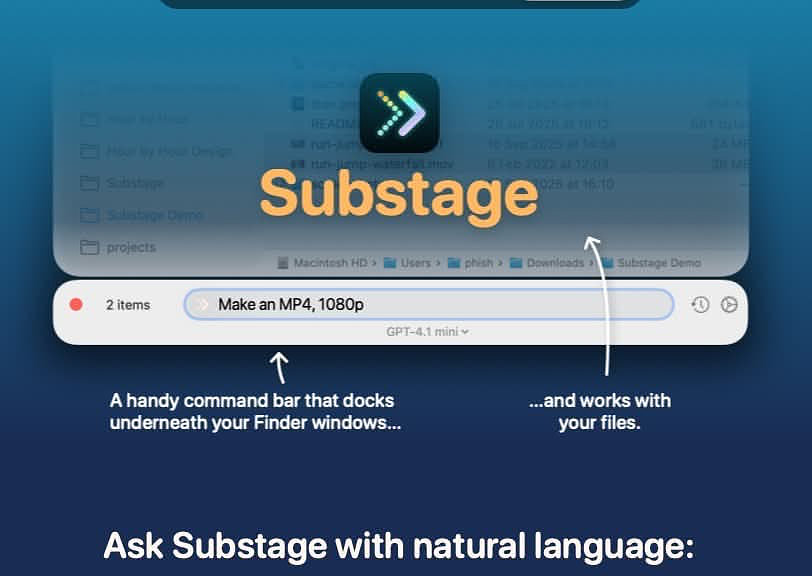
Substage is a command bar that attaches beneath your Finder window. Select files, type what you want in plain English, and Substage generates a Terminal command, previews its side effects, and runs it with confirmation when needed.
Think of it less as an AI assistant and more as a natural language layer between your intent and the Unix tools already built into macOS.
The key distinction; the AI’s role ends once the command is generated. After that, real shell tools do the work: sips, ffmpeg, zip, qpdf, pandoc, git. No hallucinated output. No “trying until something works.” The command either works or it doesn’t, just like it would in Terminal.
Developer: Selkie Design — Joe Humfrey (u/joethephish)
Platform: macOS 15.0 or later
Pricing: BYOK — $39.99. Currently on sale for $5 at Bundlehunt
Website:
Let’s Get One Thing Straight
Even if you’re comfortable in the Terminal, it can still be tedious.
Using natural language to drive command-line tools isn’t about avoiding the shell; it’s about removing friction. I reach for Substage in the same situations where I’d otherwise open a converter app, type out a sips command, or navigate into a deeply nested folder just to run something quick.
The goal isn’t to replace knowledge; it’s to make it easier to apply.
Features That Matter
Substage Predicts
This is what makes the app practical.
Before running anything, Substage simulates the command using a custom interpreter that understands pipes, redirection, and arguments across a wide range of tools. You can see exactly what will happen; which files will be created, renamed, moved, or deleted.
This feeds into Auto-run:
- Read-only operations can run automatically
- Destructive actions always require confirmation
It’s not just a safety layer; it gives you confidence to use it for real work.
Instant Actions
For simple tasks, Substage skips the AI layer entirely. Commands like jpg, zip, or mp4 execute locally with no delay.
That keeps common operations fast and predictable.
Command History
Up-arrow cycles through previous commands, just like in Terminal. Small detail, but it makes repeat tasks and batch workflows much more practical.
Model Flexibility
By default, Substage uses GPT-4.1 Mini; fast and reliable for most tasks.
The BYOK license lets you use your own API keys or local models via Ollama or LM Studio. OpenRouter and Perplexity also work with custom configuration.
Global Shortcut
Ctrl-Space by default. Opens Substage under the active Finder window. Fast enough to become muscle memory.
Real-World Use Cases
This is where it starts to earn its keep:
- Batch image resizing across folders
- Video conversion with control over resolution, FPS, and bitrate
- PDF workflows: merge, split, rotate, password protect, extract text
- Document conversion via
pandoc(DOCX ⇄ Markdown ⇄ HTML ⇄ EPUB) - File metadata inspection - “Where did I download this?”
- Git operations without leaving Finder
- Quick system queries without opening System Information
- Numeric calculations using
bc
It cuts out the need for one-off GUI wrappers around tools you already have.
Honest Limitations
The developer is clear about where things break down.
-
Multi-step prompts are unreliable
Chaining actions like “convert, rename, and zip into subfolders” can work, but reliability drops quickly. Better to split tasks into discrete steps. -
Finder only
No support for Path Finder or ForkLift. If you don’t use stock Finder, this won’t fit your workflow. -
Default Folder X conflicts
Documented in the FAQ. If you rely on it, test carefully. -
No multimodal features
No image analysis, no transcription, no generative features. This is strictly a file operations tool. -
Occasional lag
It can trail Finder updates slightly. Not constant, but noticeable.
The Verdict
Substage addresses a real gap; what macOS can do versus what you can remember how to ask it to do.
- Natural language handles syntax
- The simulator handles safety
- Native tools handle execution
It won’t replace Hazel, and it’s not meant to.
What it replaces is the friction between intent and execution; opening another app, digging through menus, or reconstructing a command you last used months ago.
Caveats matter:
- Default Folder X users should evaluate carefully
- Multi-step commands are hit or miss
- Finder dependency is real
But within its lane; single-step, file-focused operations; it’s genuinely useful.
If you spend a lot of time in Finder and regularly convert, inspect, compress, or manipulate files, Substage removes a surprising amount of friction.