
Why I Replaced Jettison with Ejectify after 15 Years
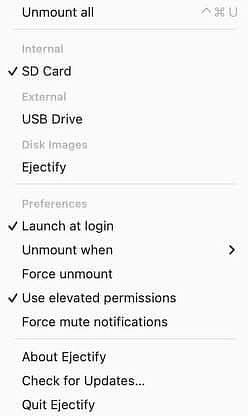
In trying to be open-minded, I recently agreed to try Ejectify, an app that performs a task for which I already had a solution: to automatically eject external disks from my Mac before it goes to sleep and to remount them when it wakes. I worked off a MacBook for a long, long time, and I needed a way to just shut it, unplug, and move on without getting nagged to death about thumb drives and external volumes. I've been using Jettison to do that since I saw it in Macworld in 2011. The developer, St. Clair Software, also makes Default Folder X, History Hound, and App Tamer.
The reason I opted to try Ejectify is that it ticks some boxes that are pretty important in 2026. It's open source and on Github, meaning you can essentially get it for free if you have the chops to build it. You can also see how the developer, Niels Mouthaan, responds to issues, both in troubleshooting and in planning for additional features. I've used other apps from Niels, and he has provided me with good support.
Aside from philosophical differences with Jettison, there are also some features added by using Ejectify.
- Volumes are managed individually, not as one size fits all, so you have more control.
- Provides a way to force unmount a disk on a case-by-case basis.
- Allows you to mute "Disks Not Ejected Properly" messages if you and macOS can't reach an agreement on what that means.
The full feature set (from the website):
- Helps prevent "Disk Not Ejected Properly" notifications after wake.
- Helps reduce the risk of data loss or corrupted volumes by safely unmounting them first.
- Lets you choose which supported volumes Ejectify manages, including external volumes, ejectable internal volumes, and disk images.
- Supports automatic unmounting when the display turns off or the system starts sleeping, then attempts to mount volumes again after wake.
- Includes force unmount, force mute notifications, and instant "Unmount all" actions, plus a global keyboard shortcut for manual unmount-all.