
ProcessSpy After a Year
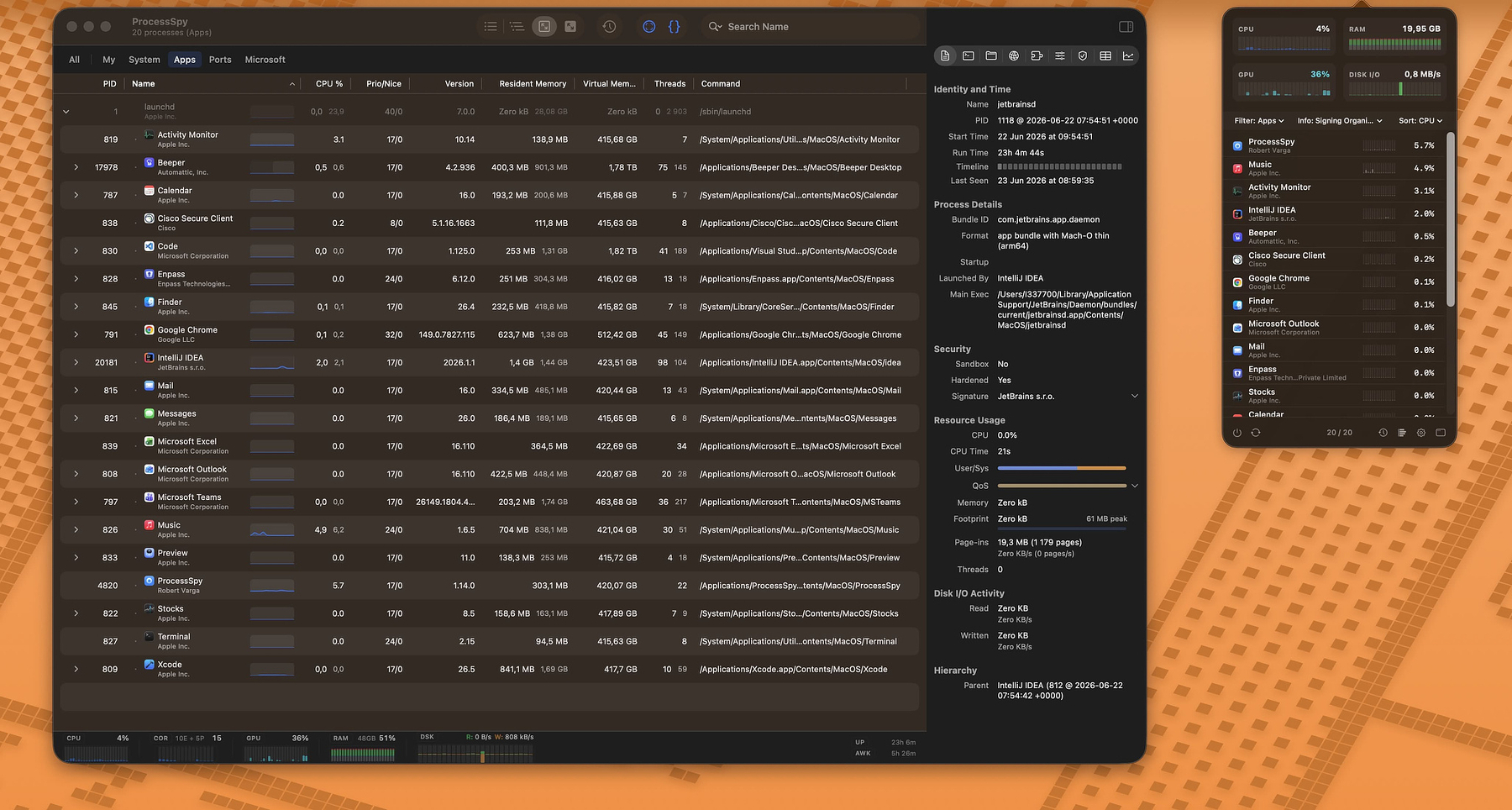
Activity Monitor is one of those apps you open when something is wrong and then quietly resent. It tells you a process called java is eating a core and offers you almost nothing else. No version, no path, no command line, no idea which of the four Java apps you have running is the culprit. For a tool that ships on every Mac, it is remarkably bad at answering the one question you actually have: what is this thing and why is it doing that?
I've spent the last year using ProcessSpy as my answer to that question, and at this point it has more or less replaced Activity Monitor in my day-to-day. It's the closest thing macOS has to Sysinternals Process Explorer, the tool Windows power users have leaned on for twenty years. That's a real gap on the Mac, and ProcessSpy is the first thing I've found that fills it without feeling like a half-finished science project.
The developer, Robert (@rob3rth), tells the origin story better than I can:
I was juggling several Java apps, each using a different JDK version — and I couldn't tell which process was which in Activity Monitor. All I saw was "java." No version, no path, no details. So I built ProcessSpy — a developer-focused tool that shows full command-line info, version details, environment variables, and more.
That's the whole pitch, and it's an honest one. If you've ever stared at three identical process names and had to guess, you already understand why this app exists.
Don't Let "Developer-Focused" Scare You Off
The marketing leans developer, but that framing undersells it. If you regularly install, test, and uninstall software — if you're the kind of person who reads a changelog for fun and wants to know what a sketchy-looking background process actually is before you trust it — this is for you too. Identifying what spawned a mystery helper, checking whether an app is running natively on Apple Silicon, confirming a signature before you grant permissions: that's power-user work, not just developer work.
The Features That Earn Their Keep
A year of updates has turned this from a clever utility into something genuinely deep. The ones I actually use:
Click-to-identify. Hit a shortcut, click any window on screen, and ProcessSpy jumps straight to the process behind it. This is the feature I didn't know I wanted and now use constantly. It's the fastest way to answer "what is this window and what's it tied to?"
The Inspector pane. Select a process and you get the full picture: command line and path, digital signature and signing organization, whether it's sandboxed or hardened-runtime, native vs. translated, memory footprint with peak tracking, and live disk read/write rates. This is where ProcessSpy stops being a nicer Activity Monitor and starts being a diagnostic tool.
Advanced Tree View with aggregate totals. Modern Mac apps spawn a small army of helpers and XPC services. ProcessSpy groups them, links related XPC services by their responsible PID, and rolls up CPU, memory, and thread totals so you can see an app's real footprint instead of its main process pretending to be lightweight.
Finished process recall. This one is genuinely uncommon. ProcessSpy remembers processes after they exit — their command line, environment variables, and history — and even shows a countdown of how long until it forgets them. If something flashes up, misbehaves, and vanishes before you can inspect it, you can still catch it after the fact.
History recording with CSV export. It logs CPU, memory, and thread usage over time on visual timelines, marks when an app was active, and exports to CSV. Transient spikes stop being a mystery you have to reproduce live.
Multi-property regex search and JavaScript filters. Quick search handles regex (wrap it in slashes, /java|node/) across multiple properties at once, so you can match "java" in the name and -Xmx in the command line in one go. For anything more involved, you can write real filters as JavaScript expressions with multiple conditions.
Menu bar dashboard and status bar indicators. A compact popover gives you live system health and the main-window tools without leaving what you're doing, and the status bar can show CPU, GPU, memory, and disk usage at a glance.
Run Shortcuts on process events. You can trigger a macOS Shortcut when a process starts or finishes. Niche, but if you live in automation it opens some genuinely useful doors.
There's also the quieter stuff that makes daily use pleasant: a Version column right in the main table, context-menu actions like Show in Finder, copy path, and search-this-process-online, and deep inspection of entitlements, Info.plist, and bundle ID. Several of those — environment variables, entitlements, the full history features — live behind the paid license.
What People Are Saying
There isn't much independent press on ProcessSpy yet — it's an indie tool from a solo developer, not a venture-backed launch — but the buyers who've left feedback on Gumroad are blunt in the way satisfied power users tend to be. One verified buyer, Arie Stavchansky, put it the way I would have:
I was looking for an equivalent to SysInternals ProcessExplorer for Windows. This is it — it has all the features. I love me a native macOS app!
Another, Daniel Jarusch:
All the information in one clear and intuitive interface — brilliant work, thank you very much!
That "native macOS app" point matters. ProcessSpy is built on native APIs and AppKit rather than some cross-platform wrapper, and it shows in how fast and responsive it feels.
Pricing and Availability
ProcessSpy runs on Intel and Apple Silicon Macs on macOS 14 (Sonoma) or newer, and it already supports macOS 26 Tahoe. It's distributed as an Apple-notarized, signed .app inside a roughly 4 MB .dmg, or through Homebrew:
brew install --cask processspy
The free version is fully functional for core monitoring. The paid license unlocks the deep-inspection features (environment variables; entitlements, Info.plist, and bundle ID), the history and CSV export tools, and removes the startup countdown screen the free version makes you sit through.
The license is a one-time $34.99 on Gumroad, good for one user across unlimited personal devices, with lifetime updates. That's up from the $24.99 some listing sites still show, so the price has climbed — but for a tool I open this often, and one that's shipped this many real updates in a year, it's an easy call. There's no subscription, which in 2026 is worth saying out loud.
If you've ever lost twenty minutes to a process you couldn't identify, ProcessSpy pays for itself the first time it hands you the answer in one click.
ProcessSpy is made by Robert (@rob3rth), who also builds Restretto (a REST client) and a couple of other focused Mac utilities. Worth a look if this one lands for you.