Mira Makes YouTube Usable
TL;DR: Mira is a small (5.6 MB), native Mac app that makes YouTube calm and pleasant: no Shorts, no sponsor segments, no recommendation rabbit hole. It folds SponsorBlock, Return YouTube Dislike, searchable transcripts, optional bring-your-own-key AI summaries, Picture-in-Picture, background audio, and a real Focus Mode into one signed app instead of the pile of browser extensions you have to maintain on your on. It collects zero data, has a long free trial and costs $39.99 for a lifetime license (or $2.99/month). If you only want ads gone and you are fine with YouTune in a browser, Brave or the Vinegar + SponsorBlock Safari combo does that for free; if you want YouTube genuinely de-Googled, FreeTube or Yattee are the better pick. For everyone who just wants one quiet, native place to watch, Mira is worth the money. eryone who just wants one quiet, native place to watch, Mira is worth the money.
Mira: Focused Video Player
Buckle up. This is going to be longer than normal, but it's about an app in a pretty crowded field that needs lots of boxes checked in order to compete. Mira is a small but powerful native Mac app with unique YouTube enhancements. It also folds almost all the YouTube features you get from using DIY combos (e.g. Brave/Firefox plus Ublock, SponsorBlock, etc) or other stand alone players (Yattee, FreeTube) into one, unified experience.
If you haven't spent any time on YouTube in the past year you might not know how awful the experience has become: More ads, more Shorts shoved into every feed, autoplay previews chirping at you from the home page, and a "Continue watching?" nag that kills a three-hour lecture stream the moment you walk away. You can kinda sorta deal with the aggravation by piling on extensions like Return YouTube Dislike and the others I've mentioned, but you have to maintain that yourself and there is always the danger of one part not playing nice with another part.
Mira - Focused Video Player (its official App Store Name) is native on the Mac (and iPad and iPhone). It's not some giant Electron thing you get, unsigned from a GitHub page. It's from developer Nicholas Hershy (Hershkovitz Bros LLC) who shipped version 1.0 in May of 2026 (hence the lack of buzz), and it's been getting near-daily point updates since. It's on the App Store, and the home page is watchwithmira.com. Mira has the best privacy policy available, "The developer does not collect any data from this app." (Note: There are other apps named Mira and a video conversion app called Miro. Make sure you are testing the right one.) (Second note - Mira also works with all the big streaming services but for the purpose of this review, I'm concentrating on YouTube)
The Mac Experience
Mira operates like a browser for video. On the Mac it's a full tabbed app: ⌘T for a new tab, ⌃Tab to cycle, using standard Mac shortcuts. You can drag a link in from Safari, Mail, Notes, or Messages and it opens instantly. You can drag links back out to share them. That drag-in/drag-out behavior is Mac-only and it's the kind of small thing that makes the app feel native rather than a phone app stretched to fit a window.
Here's what you get:
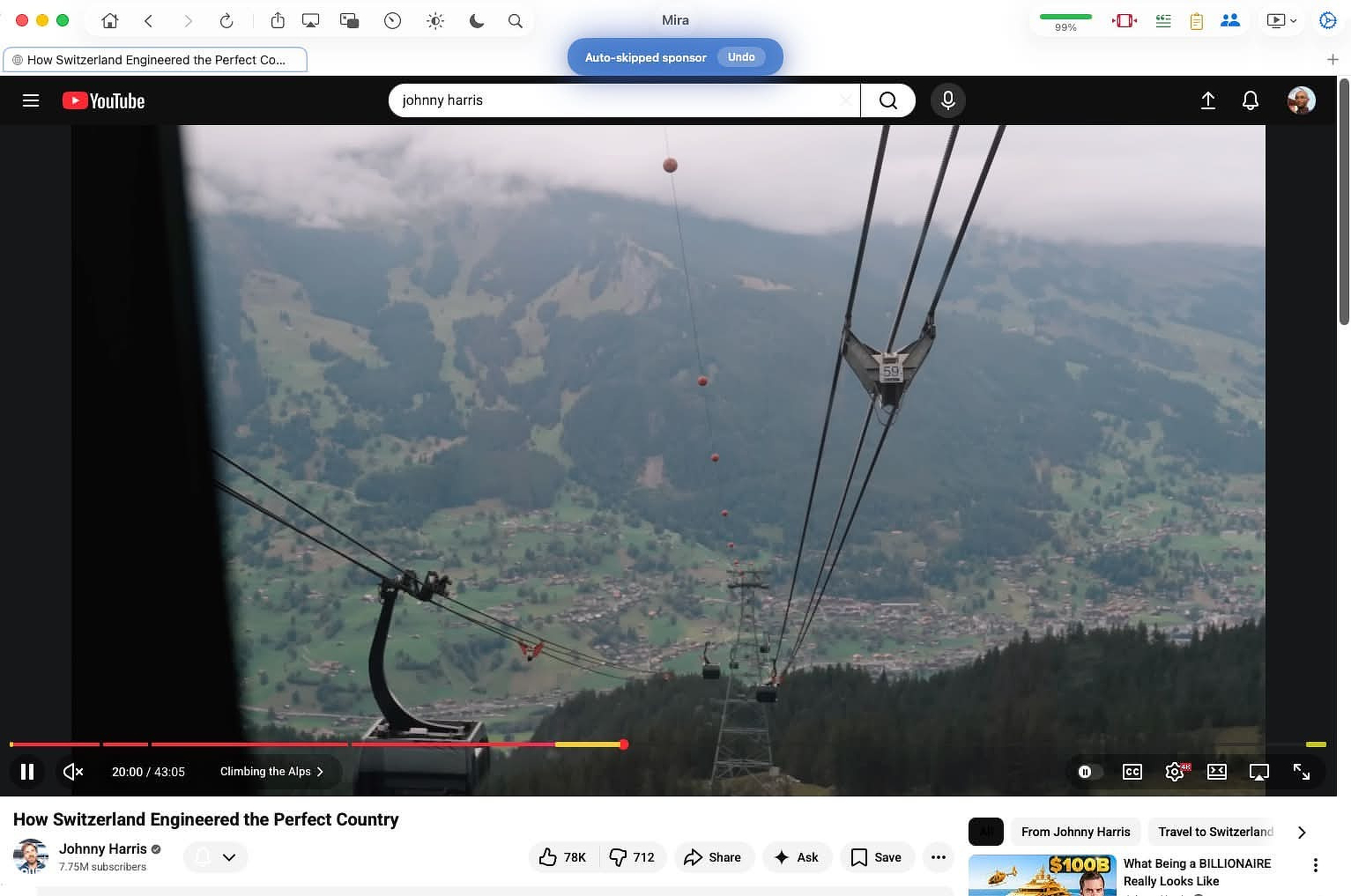
- SponsorBlock, built in. Skips sponsors, intros, outros, self-promos, "like and subscribe" reminders, recaps, and filler using the community timestamp database. You pick which categories to skip, you can color-code them on the timeline, and if it skips something you wanted, an Undo toast lets you jump back. You can also submit new segments from inside the app.
- Focus Mode. Strips the YouTube homepage down to a search bar, and hides comments and the recommendation rail on a video page. This is the feature that changes how you use YouTube; you go to watch a specific thing instead of falling into the feed.
- Set-and-forget UI tweaks. Hide Shorts everywhere, hide Playables, kill autoplay thumbnail previews, force theater mode, default to best quality (up to 4K). Set once, stays set.
- Return YouTube Dislike, integrated. A color-coded ratio bar shows the like percentage so you can judge a video before committing.
- Auto-dismiss "Are you still watching?" so long playlists, lectures, and live streams don't die when you step away.
- Picture-in-Picture and background audio. Float a video over your other apps, or lock the screen and keep the audio going.
- Transcripts. Open a video's full transcript, search it like a document, and tap a line to jump to that moment. This works without any AI key and is reason enough to keep the app open if you research from video.
It runs on macOS 14 or later.
AI with BYOK (but only if you want it)
I think the AI features are valuable, but you do you. Mira doesn't try to sell you marked up tokens or a subscription that coincidentally tracks your viewing habits. It's strictly BYOK from the usual suspects, Claude, OpenAI, and Grok. Mira's AI Summaries include key takeaways, quotes, an outline, a 15-second version, "explain like I'm 12," fact-checked claims, plus a follow-up chat, all gathered, I assume, from a well-constructed prompt that runs in the background.
The reality: you're paying the AI provider directly, pennies at a time. The docs note a $5 preload lasts a long time because a summary costs a fraction of a cent. The catch is that you need billing enabled on the provider account; a bare API key with no payment method returns an error. The good news is that transcripts work without any of this.
Provides More than Brave/Firefox with Extensions
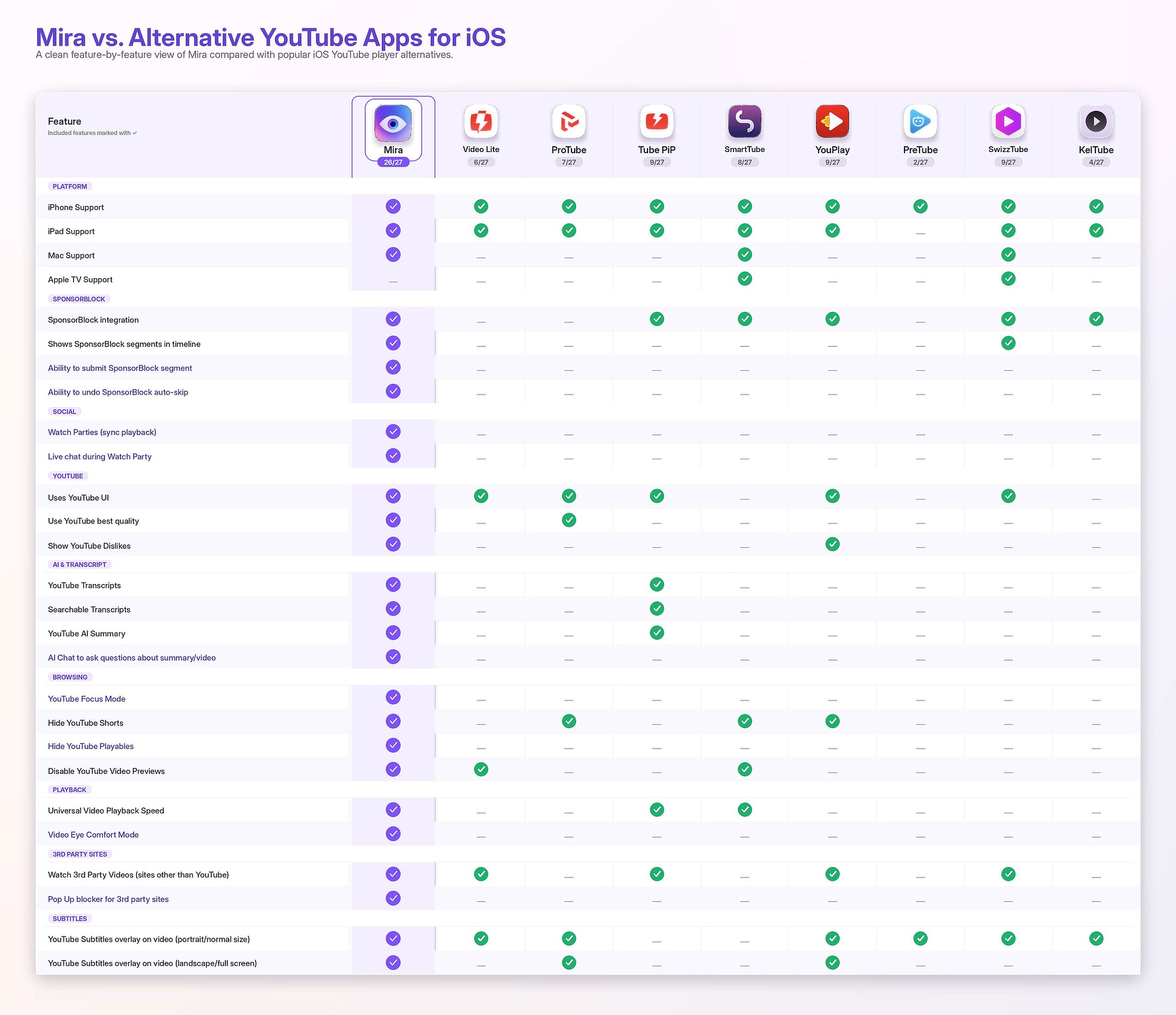
I can already hear that guy in the back sneering because he uses Brave. Yes, iBrave blocks YouTube ads for free, it has SponsorBlock-style features and a built-in PiP, and it costs nothing. If your only goal is "no ads," Brave is the cheaper answer, no argument. Mira earns its price by adding features you don't get in a browser. If any of these appeal to you, you need an app.
- It's a single-purpose app, not a browser tab. Video lives in its own Dock icon and its own window, separate from the 40 tabs you have open for work. That separation is the actual product.
- Focus Mode has no real Brave equivalent. Brave removes ads; it doesn't strip the recommendation feed and comments to stop the infinite-scroll trap. That's a behavior change, not an ad fix.
- SponsorBlock, dislikes, best-quality, theater mode, hide-Shorts, and dismiss-the-nag are bundled and pre-wired. In Brave you assemble most of this from extensions and settings and maintain it. Mira ships it as toggles.
- One purchase covers iOS and iPadOS too, where Brave's YouTube handling is weaker and background audio is a fight. Mira gives you background play and PiP on the phone in the same app.
- Transcripts, in-app search, and bring-your-own-key AI summaries have no Brave counterpart at all.
- No data collection. Apple's privacy label lists "Data Not Collected," and the AI key stays on-device. Brave is privacy-minded too, but Mira's surface area is tiny by comparison.
- Watch Together sync rooms with chat for up to 10 people; Brave has nothing like it.
If you just want ads gone, Brave (or any browser with uBlock Origin) does that for free, and Mira's $40 lifetime price only makes sense if Focus Mode, transcripts, and the all-in-one packaging are value added for your personal use case.
The other free-and-cheap route worth naming is the Safari-extension stack: Vinegar (Two dollars, one-time) replaces YouTube's player with a plain native HTML5 player, kills most ads and the autoplay cruft, restores PiP and background-ish playback, and pairs with the free/cheap SponsorBlock for Safari to skip segments. For a lot of Mac users this is the actual default alternative to a wrapper, and it stays inside Safari. What it doesn't give you: a separate app window, Focus Mode's feed-stripping, transcripts, AI, or Watch Together. It's the minimalist's answer; Mira is full-featured.
The Competition - Free and Paid
I've tested a lot of apps in this category and the one that comes closest to matching Mira is Friendly Streaming Browser. Friendly is the same core idea as Mira: one native-feeling window that wraps Netflix, YouTube, Disney+, Prime Video, Hulu, Spotify, and the rest, with a built-in YouTube ad blocker, Picture-in-Picture, and some media-player extras (local file playback, brightness/contrast/transparency adjustments). It's published by Sensor Tower, it's been on the Mac App Store since around 2012, and it's free to download with an optional paid tier (a few dollars) for extra ad-blocking and to tip the team.
I wouldn't recommend it to anyone though. It's literally owned by a data mining company, Sensor Tower, and one read through its privacy policy should send you screaming out of the room.
https://sensortower.com/friendly-privacy-policy
The closest comparisons are the open-source YouTube front ends. Two are worth knowing:
FreeTube is free, privacy-first, blocks ads, integrates SponsorBlock, and runs without a Google account. It's an Electron app and a YouTube client, full stop.
Yattee is the one that overlaps Mira's cross-platform story most directly: free, open-source (AGPL), native, and it runs on macOS, iOS, and tvOS. It routes through Invidious/Piped instead of YouTube's own API, blocks ads, and bundles SponsorBlock, Return YouTube Dislike, PiP, AirPlay, queue, and history. If you want a privacy-respecting, no-account, genuinely free native app and you don't need the streaming-service wrapping or AI, Yattee is the strongest free alternative on the Mac and deserves a real look before you pay for anything.
MacTube still works, but its last release was February 2022.
FreeTube and Yattee are both excellent and free, so Mira has to justify itself against them. Things Mira does that the open-source crowd generally doesn't:
- It's not YouTube-only. Mira wraps Netflix, Disney+, Max, Hulu, Prime Video, Apple TV+, Twitch, and more in the same window, and you can add any public video site as a custom platform with popup blocking. FreeTube and Yattee are YouTube clients, full stop.
- Watch Together with synced playback and chat across Mac, iPad, and iPhone. That's a feature you normally need a separate service (or a Discord screen-share) to get; none of the open-source clients do it.
- In-app AI summaries with your own API key. The others have transcripts and SponsorBlock; none of them summarize.
- It uses the real YouTube signed-in experience, so your subscriptions, history, and watch state are intact. FreeTube and Yattee deliberately avoid the Google account (Yattee even proxies through Invidious/Piped), which is great for privacy but means a different, account-less experience. Mira's trade-off runs the other way: you stay logged into YouTube and get the full account, you just hide the noise around it.
- A genuinely native, signed, current Mac/iOS app from one universal purchase, versus an Electron app (FreeTube) or a third-party-instance-dependent client (Yattee).
If you want YouTube without the tracking, then Mira isn't for you. FreeTube and Yattee are the solutions you want.
Pricing
Three options, billed through Apple:
- Monthly: $2.99/month
- Annual: $19.99/year
- Lifetime: $39.99 one-time
You get 5 days of full access on install, after which the subscriptions start with a 7-day free trial; Lifetime has no trial. For an app you'd use daily, the $39.99 lifetime is the one that makes sense, and it's nice to see a lifetime option offered at all instead of subscription-only. All three unlock all platforms.
iPhone and iPadOS, If You're Interested
Mira is a universal app: one buy unlocks iPhone, iPad, and Mac. It syncs nothing to a Mira account because there isn't one. On iOS and iPadOS the controls collapse into a floating "eye button" in the corner that opens a tool menu and fades as you scroll, rather than the Mac's persistent toolbar. iPad lets you reposition the toolbar to the left, top, or right edge. The mobile versions add gesture controls (swipe up for fullscreen, pinch to crop a wide video edge-to-edge) and lean on an iOS built-in fullscreen player for the custom sites you add yourself, which sidesteps the usual mobile-web fullscreen breakage. Background play and PiP carry over, which is the main reason to want this on a phone: free YouTube on iOS won't play audio with the screen off, and Mira will. Both mobile platforms require iOS/iPadOS 17. One real limitation worth knowing: on iPhone and iPad, a Watch Together session drops if you background the app for more than about 30 seconds, because iOS won't hold the connection open. The Mac doesn't have that problem.