
CurrentKey, Removing Mac Friction Points with Space Naming and ScreenTime Info You Can Actually Use
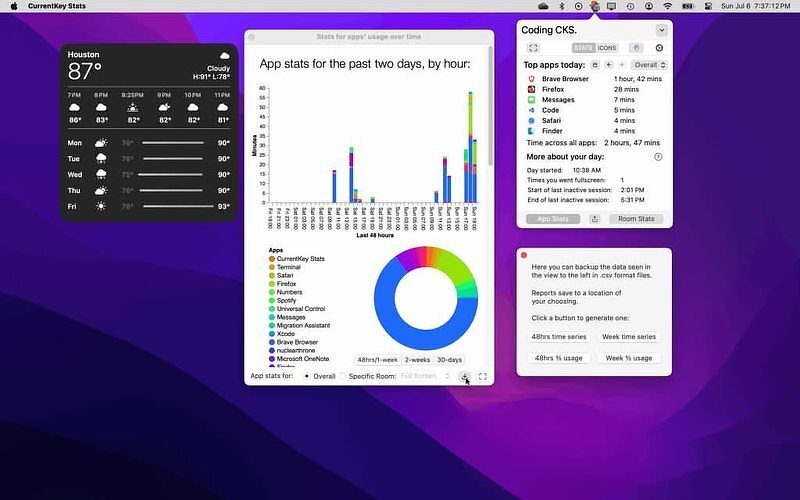
Here are two Mac friction points:
- It's been 16 years since Mission Control was released, and "Desktop 3" is still "Desktop 3." Apple's API doesn't expose Space naming to any third-party app — there's no system-level hook to hang a label on.
- Screen Time gets activated when an app launches and stays that way as long as the app is open; the clock keeps ticking even if the app is minimized or buried six windows deep on your desktop. To me, that makes it practically useless.
There's an app that deals with both of those irritants: CurrentKey (formerly CurrentKey Stats) wraps every Space in a named, icon-coded "Room" you can jump to by hotkey or dropdown, then quietly logs how much time you actually spend in each one, broken down by app. The name lives in CurrentKey's own popover and menu bar, not inside Mission Control itself.
I wrote about CurrentKey a couple of years ago (CurrentKey Stats - A Triple Threat App, when it was working through a subscription model — an admitted turn-off for many. Today the app is free, although if you want to support the developer, Spencer Dailey, you can pay $3.99 to turn on a cosmetic layer that offers custom icon colors, any emoji as a Room icon, custom icon images, and banner images that pop up in a screen corner when you enter a Room. Those are nice to have but don't affect functionality. The basic (free) version has Room naming, hotkeys, switching, AppleScript triggers, and stats/export functionality. (App Store)
Five Features, Well Done
- AppleScript hooks on every Room switch. This is the feature that separates CurrentKey from being just another desktop labeler — you can automatically fire a script the moment you enter or leave a Room, which means bringing a specific app forward, pausing a timer just by switching context or even something crazy, like triggering smart lights.
- Time tracking scoped to foreground use, not just "app open." Unlike Screen Time, which counts an app as active the whole time it's running, CurrentKey only counts minutes an app is actually in the foreground — closer to what a freelancer billing by the hour actually needs.
- Per-Room, per-app breakdowns with CSV export. Eleven charts, 30-day history, daily and weekly summaries, and a real export path if you want to reconcile hours against a client invoice instead of trusting a dashboard.
- Hotkey-driven Room switching, up to 16 per screen. Mac Spaces already cap at 16 per display; CurrentKey lets you actually use that ceiling by making each one reachable without a three-finger swipe and a guess.
- All data stays on-device. No account, no cloud sync required to use the core app — export is opt-in, which matters if the whole point is separating "work" time from "distraction" time and you'd rather that stay local.
Alternatives
- SpaceJump ($9.99 one-time after a 14-day trial) is the more direct competitor — it uses overlay windows to project custom Space name labels onto the Mission Control view itself (no SIP disable required), and it also tracks time per Space. It's not "true" system-level renaming either — Apple doesn't expose that to anyone — but the label appears inside Mission Control rather than in a separate popover, which is a real difference in feel from CurrentKey. Pricier, and it skips the AppleScript hooks.
- Desktop Space Renamer is a lightweight, low-cost menu bar app that does the naming and emoji-labeling part of CurrentKey's job with none of the time-tracking or scripting depth — a fine choice if all you want is to stop guessing which Space is which.
- spaces-renamer (free, open source) is the older, hackier route: a SIMBL-plugin-based renamer that predates Apple Silicon and reportedly doesn't work reliably on M1/M2 Macs or recent macOS versions. It's free, but effectively unmaintained for anyone on current hardware.
If you use BetterTouchTool, and you know how to use it, you already have multi-Space switching, window snapping tied to specific Spaces, and gesture-triggered Mission Control previews as part of a much larger automation toolkit. You lose CurrentKey's purpose-built stats and per-Room AppleScript triggers.
Who This Helps
You can use CurrentKey if your Mac already has more Spaces than you can honestly remember, and you want both the friction of switching between them and the accounting of time spent in them solved by one small, actively maintained, free utility with real scripting hooks. The AppleScript integration in particular is doing work other Space renaming apps don't.
Who This Isn't For
If you want the Space name to actually show up inside Mission Control's swipe-up view rather than in a separate popover, CurrentKey won't scratch that itch — SpaceJump will, for the extra cost.