
Resurf – A Well-Designed (Almost) Everything Box
Resurf – A Well-Designed (Almost) Everything Box
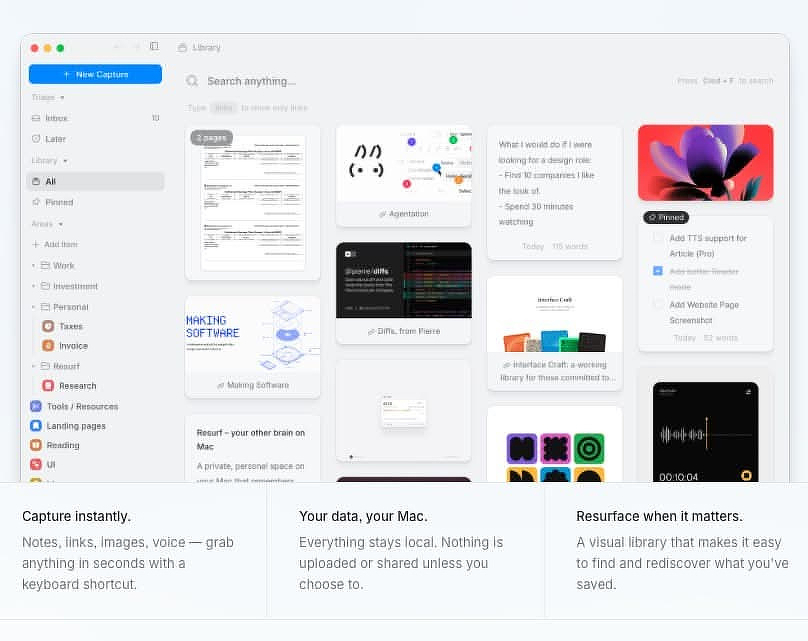
Resurf is a clever new app, currently in beta, with a lot of potential. This is one of those “I needed an app to do X, so I built one” projects; the difference is that it was built by a design engineer who clearly understands macOS conventions. The result feels native and thoughtfully put together.
Using it brought back a few workflow habits I haven’t used since the days when Evernote was king.
The entry point into Resurf is a floating capture widget that you trigger with a shortcut. From there you can use either the mouse or the keyboard to capture five types of content, with some overlap:
- Notes
- Links
- Screenshots (using a built-in capture tool)
- Media
- Voice memos
The same widget also provides a Spotlight-style search across your Resurf vault, which is essentially the folder where everything you capture is stored.
Practical Use Cases
There are several ways Resurf can fit into a real workflow.
- Screenshot organizer
A quick way to capture, store, and resurface reference screenshots without littering your desktop with files namedScreenshot 2026-03-21 at 10.43.11.png. - Bookmarks and lightweight browser
Links can open directly inside Resurf so you can skim content without switching to a browser. Eligible pages default to Reader View with adjustable font sizes, but you can switch to a standard page view or send the link to your default browser. - Scratchpad
If you need a fast place to dump temporary information, Resurf works well as a searchable scratchpad. You can open straight into the notes interface and start typing. - Quick notes staging area
Once the shortcut becomes muscle memory, it’s easy to use Resurf for quick capture even if you keep your long-term notes somewhere else. When something turns out to be worth keeping, the macOS share sheet makes it simple to move it into another app.
Organizing Your Data
A Resurf vault can live in iCloud, in another synced folder like Dropbox, or locally on your Mac. If you use iCloud, you’ll be able to pair the Mac version with the upcoming iOS app.
You can also maintain multiple vaults, each located anywhere in your file system.
Within a vault, Resurf provides several ways to organize what you capture:
- Inbox / Later
If you don’t want to categorize items during capture, everything can go into an Inbox for later triage. There’s also a Later folder for items you want to defer organizing. - Areas
Areas function much like folders and can hold any content type. - Tags
Tags can be created during capture. The sidebar includes both a tag browser and a dedicated tag view. - Pins
Any item can be pinned to the top of its area. - Voice memo export for transcription
Voice memos can be exported to the file system, making it easy to run them through a transcription tool and turn them into text documents.
Nice Touches
A few small details show that the developer thought about real usage rather than just features.
- Share Sheet support
Resurf stores notes internally as JSON rather than plain files, but exporting content to other apps is straightforward through the macOS share sheet. - Open In
Similar to the share sheet; lets you send items directly to another app. - Instant Markdown rendering
Markdown renders automatically without switching between edit and preview modes. - Slash commands
Formatting can be applied quickly using slash commands. - Notes about notes
Every captured item can include an attached note, which is handy for adding context to screenshots, links, or media. - Chrome extension
Lets you save links directly from the browser.
Feature Requests
Resurf is still early in development, and there are a few capabilities that would make it significantly more powerful.
- Support for clickable internal links to things like Mail messages or Obsidian notes
- The ability to attach arbitrary documents to notes
- Inline images inside notes (currently you can only add notes about images)
- Shortcuts and AppleScript support
- A Safari extension
Privacy
You can read the full policy here:
https://resurf.so/privacy
Regardless of where your vault lives, your data remains private. The app only contacts Resurf’s servers to validate your license. According to the developer, no identifying information or user content is transmitted during that process or afterward.
The company is based in Canada. Because they never see your data, GDPR provisions around data access, portability, and deletion are largely irrelevant in this case.
Price
$39
- One-time purchase at the early supporter price. Unlimited captures. Any updates we release are free for 2 years after stable release.
- Unlimited captures
- Mac app license (up to 2 Macs)
- All beta updates included
- Any updates released are free for 2 years after stable release
- Priority email support