
A Cool Thing Happened on Reddit

I cross post most of the app reviews I write here to r/macapps on Reddit. I just noticed tonight that the mods over there have listed AppAddict in the sidebar as a “Great Resource”. This is just a hobby blog, not monetized in any way. I try to bring an honest and unbiased opinion to my reviews to help Mac users discover great software. It’s very rewarding to get more reach and I really appreciate being listed. I’ve been a Mac user for 25 years, most of that spent providing technical services to others in the education field. I’ve invested thousands of dollars in software over the years and regret none of it. I’d rather have a full hard drive than a new car. Thanks for reading and feel free to suggest any apps you think I should take a look at.
SuperDuper! Disk Cloner

I bought the disk cloning software, SuperDuper!
in 2004 and have been receiving updates for the past 20 years without
ever being charged an additional dime. I use it alongside Time Machine
to create a bootable backup of my MacBook’s hard drive. It has a clearly
understandable user interface where it explains everything in plain
language so there is never any ambiguity about what operation you are
choosing to do.
Features
Scheduled backups - set it and
forget it
Incremental Smart Backups - No need to
clone your entire disk again, just backup what has changed since you
last ran SuperDuper!
Snapshots - You can choose to
make a copy of your hard drive as it existed at a point in the past
based on snapshots created by macOS. This is deal for returning your
drive to the state it was in prior to an aborted update or file deletion
event.
SmartWake - ensures your backups happen
whether your Mac is awake or asleep
You can download and use SuperDuper! to make unlimited disk clones for free. To unlock its advanced features you can purchase it for $27.95 and receive updates forever.
(EDIT: The Rosetta version works on Apple Silicon, but to get a native version if you have a pre-2109 license, there is a charge. If you buy the current version, you can download older versions)
iA Writer

iA writer a markdown/plain text editor designed especially for writing and document creation. It isn’t a text editor in the fashion of VS Code or BBEdit. If you aren’t a markdown wiz, all of the commands are accessible from the menu bar. The simplified interface is its hallmark, but it has a variety of powerful tools behind the curtains.
Differentiating Authors
iA Writer can tint the text you paste into a document (i.e,. from an AI source) differently than the text you type in so that you can distinguish your writing from that of another author or AI.
Syntax Highlighting
iA Writer uses color codes to showcase different parts of speech (adjectives, nouns adverbs) and its built-in editor helps you identify and get rid of filler words, cliches and redundancies.
Focus Mode
In focus mode, iA Writer highlights just the line or paragraph you are working on to mimic the experience of using a typewriter. This allows you a distraction free writing experience where you can concentrate on your current idea.
Linking
iA Writer supports wikilinks to connect your documents. You can easily move between documents by following links or using arrow buttons on the toolbar.
Publishing and Export
iA Writer supports direct publishing to Ghost, Medium. Micro.blog, Micropub and WordPress. You can export documents as Markdown, HTML, PDF or Microsoft Word formatted documents. You can insert images into documents via Markdown and as content blocks that can be seen in the built in preview mode.
iA writer is developed by a well established Japan based team. It’s been around for awhile and continues to evolve. A desktop license is $49 and separate license is required for use on an iPhone or iPad. Minor upgrades are free. Major upgrades incur a cost. A free 15-day trial is offered. Their website says subscription pricing for mac and iOS is coming.
My Blogging Workflow

For the past six weeks I’ve averaged about 16-17 posts a week on three different blogs. I’ve also been sharing a photo every day on Micro.blog from a project I did a while back called 100 Strangers. I just started a links blog that I will try to post to every day. I usually write my posts a day ahead of time. I start writing in Obsidian, using Markdown if my post is going on Micro.blog, OMG.LOL or BearBlog. If it’s a post going on Scribbles, then I still use Obsidian, but I leave it as plain text.
Very occasionally I will paste the content into iA writer or use the editing function of the Text Generator plugin in Obsidian to get a grammar and content check. When I first started blogging, I used the online word processor at Lex.page a few times but that is more friction than I want to deal with. Most of the time though, I just paste the content right into the web interface on Microsoft Edge, my choice of browser and use the built in spell and punctuation checks.
A lot of times, I’ll start writing at work on my lunch hour or break and pick it back up at home, relying on Obsidian sync to make the file available in both places. After writing an app review yesterday about an app I’d already written about in April, I have now started a spreadsheet to keep track of what I’ve written about so that doesn’t happen again.
I do not have a file of ideas or prompts or drafts for any of my online endeavors. For app reviews, I literally look in my Applications folder for ideas. I have over 400 apps installed, so I have a lot to choose from. For my tech blog, where I only write long form posts a couple of times a week, I just have to pick up ideas from reading or online forums. For my personal blog, just start brainstorming in the morning until an idea occurs to me.
Every platform I use allows you to schedule posts ahead of time and I use that feature each night to schedule everything for the next morning. I get up at 4:30am and by that time the folks in Europe are already awake and online. By 8am, everything I’ve written the previous day is posted and the whole process starts over.
HistoryHound a Must Have Research Tool

If you spend much time in a browser (and if you are reading this, I know that you do), the time invariably comes when you want to find an article you read last week so you dive into your browser history and you start guess at search terms. It can get frustrating pretty quickly. If you use more than one browser or a browser and an RSS reader. You have to jump from one to another hoping you can remember the title of whatever it is that you are looking for. You don’t have to live this way.
HistoryHound, a utility from St. Clair Software, keeps a single database using your history from almost all major browsers and the RSS reader NetNewsWire. Browsers with built in support are Safari, Chrome, Edge, Firefox, Brave, Arc, Orion, Opera, Vivaldi, NetNewsWire and URL Manager Pro, but you can add history and bookmark folders from other apps manually. Not only does it do the normal thing, remembering page titles, it also keeps a full text index of each page you browse too, making keyword searches much, much easier. To top it off, it does the same thing for your bookmarks collections. You can even create an index of sites you want to remain searchable whether you visit them regularly or not. You can set the length of time you want HistoryHound to keep track of your browsing independently of your browser settings. You can summon HistoryHound with a keyboard short cut and search for any or all of your search terms, use a Boolean search, or take advantage of the include/exclude notation to quickly find what you want. If you have certain sensitive sites that you don’t want recorded or indexed, you can set filters to make that happen. The app has a webkit based browser built right into its interface so you don’t even need to go into your main browser when searching.
HistoryHound has a 30-day free trial and is a one-time purchase price of
$14.95. It is compatible with Mac OS 10.13 -
15.x.
The Many Apps of Sindre Sorhus

Whether you know who Sindre Sorhus is or not you still may be
using one of his many popular
and mostly free apps. Sindre is a full-time open-source developer
currently based in Thailand who is responsible for more than 1,000
packages at npm, the world’s largest software directory. In his spare
time (LOL) he creates wonderful macOS and iOS apps. According to a
statement on his website, if you’re a student who can’t afford one of
his paid apps, he will give it to you for free. He’s released mora apps
than I can cover in one review, but I will list the ones with which I am
most familiar.
Aiko (free) - High-quality on-device transcription.
Easily convert speech to text from meetings, lectures, and more. You can
export the transcription as subtitles too. Link
Hyperduck (free) - Quickly send a link from your iOS
device to your Mac. Works even id either device is offline. Can share
from any app, not just Safari. Opens the link directly in the browser on
your Mac. Link
AmazingAi (free) - Local only image generation via
the Stable Diffusion engine on Apple silicon. Simply describe the image
you desire, and the app will generate it for you like magic! Link
Velja Browser Picker (free) - lets you to open links
in specific browser or browser profile, switch between browsers
effortlessly, and directly launch desktop apps for specific websites,
like opening Zoom links in the Zoom app. Link
One Thing (free) - Put your most important task or
goal in the menu bar. Its presence there will help remind you without
being annoying. You can achieve almost anything if you focus on one
thing at a time. Link
Actions (free) - Useful actions for shortcuts. It
adds over 50 useful actions not built in natively to the Shortcuts app
and is a must have for anyone who uses them. Link
Shareful (free) - Shareful makes the system share
menu even more useful by providing some commonly needed share
services:
- Copy — Copy the shared item to the clipboard and so you
can quickly paste it into another app.
- Save to Downloads —
Quickly save a shared item to the Downloads directory.
- Save As —
Choose a directory to save the shared item to.
- Open In — Open the
shared item in any app. Link
PopClip - A Must Have Productivity App

PopClip is a highly configurable app that lets your perform an amazing number of actions on any text you select on your display. I immediately miss it if I am working on a strange computer and on my 18-month exile to PC land at work, I searched in vain for a PC alternative. Due to Apple’s stringent sandboxing rules, PopClip is no longer available in the App Store, although it is still under active development. If you have an App Store version, it will be recognized and converted when you download the update from the developer’s site. New extensions are being added constantly. If you are a developer, there is a guide available to creating your own custom extensions.
My personal PopClip actions are:
- Correct Spelling
- Search in Google
- Open Link
- Bookmark Link in Raindrop.io
- Send link to Omnivore
- Send to Day One
- Send To Email
- Create TextExpander snippet
- Create Message
- Add as task to Things3
- Send to Drafts
- Copy as Markdown
- Send to ChatGPT
- Slugify Text
- Send to Obsidian
There are many, many more extensions available to download in the
extensions gallery in
the following categories:
- Text editing
- Text transformation
- AI tools
- Markdown
- Text stats
- Text lists
- Text display
- Text to speech
- Language and translation
- Notes and knowledge management
- Writing apps
- To-do apps
- Calendar apps
- Contact apps
- Drag and drop
- Launcher utilities
- Native macOS apps
- Search engines
- Maps
- Social networking
- Music
- Link shorteners
- Phone numbers
- Dictionaries
- Developer tools
- Clipboard tools
For new users, a two-year
license is $12, and a lifetime license is $22. PopClip is also
available as part of Setapp.
29 New Apps Added at Mac Menu Bar

Recently Added |
MacMenuBar.com
- Keep it Shot - This menu bar app uses AI to evaluate and rename your screenshots, either in bulk or as you take them. (Freemium)
- Easy Move+Resize - This menu bar app adds “modifier key + mouse drag” move and resize to your MacOS. (Free)
- EasyDict - This menu bar app lets you look up words or translate text. It can automatically detect the language of the input text, supports input translate, select translate, and OCR screenshot translate. (Free)
- MenuBar Next - This menu bar app displays the first line of a text file in your menu bar (Free)
- DynamicLake Pro - DynamicLake transforms your dynamic island into so much more. It lets you effortlessly control essential system functions such as volume, brightness, and keyboard backlight. Take control of your music, scheduling, weather, and much more. (Paid)
- PasteKit - PasteKit lets you record sound (system sound, microphone, etc.), video, and screenshots in one simple, all-in-one solution. And any recordings you make are automatically copied to the clipboard, allowing you to put them wherever you like. (Paid)
- GlimpseEase - This menu bar app automatically monitors your Stripe transactions, keeping you informed without the constant need to glance at your phone during work hours. (Feemium)
- MenuBar Weather - MenuBar Weather displays all major weather information for your current location at a glance. It updates hourly or every significant location change. (Free)
- Text Workflow - Text Workflow lets you automate text transformations. The program has a menu bar app that allows users to choose a workflow to convert the text from their clipboard.(Paid)
- Week Number - This menu bar app shows the week number. The prefix is customizable. (Free)
- HueMenu - With a single click in your menu bar, you can change the color and brightness of your Philips Hue lights, as well as turn them on or off. (Paid)
- Steecky - Steecky is the text editor located in your menu bar. It’s always accessible, whether you’re working on something important or browsing the web. Steecky stores your entries as you type, ensuring that all information is retained. (Free)
- Hammer - Hammer is a menu bar Icon app that assist its users in converting their clipboard data from one form to another quickly. (Paid)
- HistoryHound - This menu bar app lets you do a fast keyword search on the entire content of all web pages you’ve visited recently, plus all those that you’ve bookmarked. (Paid)
- Pomodoro Timer - This menu bar app is a minimalistic pomodoro timer and todo tracker. Stored data never leaves your device. (Paid)
- Battery Charge Reminder - This menu bar app lets you set an upper battery limit and a lower battery limit and even the frequency of the reminder notifications. (Free)
- QuickFindler - With QuickFindler, you can add your frequently opened folders, files, apps, and websites to the icon, and then open them conveniently using shortcuts. (Freemium)
- Finicky - This menu bar app allows you to set up rules that decide which browser is opened for every link or url. (Free)
- Brew Service - This menu bar app lets you (re)start and stop homebrew services. (Free)
- Icon Preview - Preview how your app icon will look in the menu bar. You can also drag and drop an image onto the menu bar icon to preview it there. Ideal for developers and designers to perfect the look of their app icons. (Free)
- Glinet Wireguard - This simple menu bar app allows you to quickly switch wireguard peers. (Free)
- Turnip - Turnip is a time tracker for freelancers and small businesses that integrates with the tools you already use. It also comes with stats and charts to visualize your time by day, week, and month. (Freemuim)
- Pin Frame - This menu bar app is a stick-on-top file viewer. It lets you place a window on top of anything else, but also adjust the window opacity and interactive mode. (Freemium)
- Zonerly - This menu bar app lets you find the correct time across multiple zones for traveling, planning meetings, calling abroad and so on. Offline mode is supported. (Paid)
- NeSleep - This menu bar app prevents any Mac from entering sleep mode, providing hassle-free protection against unexpected sleep cycles. (Free)
- AudioBuddy - If you are dissatisfied with the default Mac text-to-speech voices, this menu bar app replaces them with OpenAI. There’s a max limit of 4096 characters. (Free)
- Folderizer - This menu bar app allows you to create custom folder icons by selecting your preferred color, icon and even your own photos to accompany it. (Paid)
- iBlurred - This menu bar app allows you to blur out sensitive information. You can resize each blurred part of your screen to meet your preferences. (Free)
- Hot Corners Toggler - With this small menu bar app you can quickly toggle hot corners on and off. (Free)
Better Touch Tool Favorites

I’ve owned Better Touch Tool for years and only used it for a few things but since getting an iMac and a Magic Track Pad a few months ago, I have been making more and more use of it. Along with Raycast, Keyboard Maestro, PopClip and Hazel, it is one of the core Mac automation tools in my Applications folder. You can user the supported triggers and inpiut actions to automate almost any task. Additionally, it has :
- A clipboard manager
- Screenshot tool and editor
- Customizable window snapping & resizing & moving tools
- Window switcher
The developer is so confident in the abilities of his app, his
website contains a challenge; If you find something you can't do with
Better Touch Tool, let me know. He offers a 45 day free trial and only
charges $12 for a license with two years of updates or $24 for a
lifetime of updates. The app is also available on Setapp. There is a whole library of actions you can
download if you set up a free account on his website.
- F4 = ⌘+space, which triggers Raycast
2. fn+e = Raycast emoji picker
3. fn+v = Raycast clipboard manager
4. ⌘+Q = runs Apple Script asking "Are you sure" before quitting programs
5. shift+shift = opens/closes Notification Center
6. CTRL+CTRL = reveal desktop
7. option+option = Mission Control
8. esc+esc = start screen saver
9. three-finger click = MissionControl
10. four-finger click = lock screen
11. one-finger click, bottom left = Google Search
12. Microsoft Edge - three-finger swipe left = previous tab
13. Microsoft Edge - three-finger swipe right = next tab
14. Microsoft Edge - three-finger swipe up = new tab
15. Microsoft Edge - three-finger swipe down = close tab
16. Microsoft Edge - three-finger force click = ⌘+click (middle button replacement)
17. Hyper Key+Letter to launch Edge, Drafts, Path Finder, Ivory, Obsidian, Things 3, home folder, trash
Other Automation Apps
Keep It Shot

A new program was just added to SetApp and I decided to take it for a spin. Keep It Shot is an app that uses AI in the form of OpenAI’s ChatGPT or Microsoft’s Azure API. SetApp users can opt for an AI plan with that service. Keep It Shot is a tool that can evaluate and rename your screenshots, either in bulk or as you take them. You can use plain language to describe your naming preferences if you have any (e.g., Don’t use underscores)Once scanned and renamed, you can use a fully private, local search to find screen shots containing keyword related images.
If you aren’t a Setapp user, you can use the app for free to generate 15 renamed screenshots per month. The standard plan is $8 a month and affords you 300 renamed screenshots and for $24 a month heavy users like designers and product mangers can get 2000 renames.
On the privacy front, Keep It Shot does not store your images. The app
is under continuous development with an ambitious roadmap on its web
site. The developer seems open to user feedback based on a previous
Reddit thread from when the app was first released.
Daisy Disk, Best in Its Class

While trying out a new file manager today, I discovered that Google Drive had created two copies of itself on my hard drive, including several folders of files I’d designated to maintain locally. Because of the mysterious voodoo Apple has cursed cloud storage with, I decided to use a disk analyzer to see how my disk space was allocated and the tool I chose was Daisy Disk.
Daisy Disk is an app that needs little introduction to seasoned Mac users. It is a disk space analyzer so well designed that it has won Mac App Store awards in three different years. For under $10, you get a best in class utility that’s fast and reliable. If you’ve ever had a case where seemingly large chucks of your hard drive were showing up as mysteriously in use, you can use Daisy Disk’s power of scanning as an administrator to track down the culprit. Daisy Disk scans internal and external drives whether they are SSD or HDD. It scans local and network physical and virtual drives. You can also scan cloud storage. Only you get to decide what to delete, System files are automatically safeguarded.
Did I mention it’s fast? Other long time Mac disk scanning utilities like Grand Perspective and Omni Disk Sweeper may be free, but they are slow, very slow. They work OK, but no one would consider them best in class.
A single license lets you install Daisy Disk on up to five Macs. The developer offers educational discounts.
Open Core Legacy Patcher

OpenCore
Legacy Patcher is a free and open-source tool designed for
individuals who want to run newer versions of macOS on older,
unsupported hardware. It achieves this by patching macOS and modifying
it to work with these older models. It is based on OpenCore, a modern
and versatile bootloader for macOS. This is what the developers have to
say about compatibility with the Sequoia beta: “I am going to say this
preemptively:
- No, OCLP does not support macOS 15 yet
- No, I don't even know if it still supports Intel yet
- No, there are no ETAs
- No, please do not install it on release and then complain that it doesn't work
No ETAs for Sequoia support. Don't ask, don't try installing it. If you
try installing it, we won't help you."
Source: OCLP macOS Sequoia
Beta Status Update & WARNING!!! (youtube.com)
Having established that, if you aren’t familiar with OCLP and you have an older Mac you’d like to upgrade past its supported version of macOS, you are in luck. I recently had to turn in my 2023 M2 MacBook Air for AppleCare support and was left with a 2014 MBP as a backup. It only had the latest OS it would officially support on it and when I tried to install a few of my most used programs, I got shut down because things like Raycast and DropOver didn’t work. Luckily, OCLP exists and I was able to get past the constraints imposed by Apple.
Here’s how it works:
- The first step of ensuring whether your model is supported is by
checking the Supported
Models page.
2. Download and build macOS Installer
3. Run the OpenCore-Patcher.app
4. Reboot and boot OpenCore
Once you've installed macOS through OpenCore, you can boot up and go through the regular install process. To boot without the USB drive plugged in is quite simple:
- Download OpenCore Legacy Patcher
* Change Patcher settings as you'd like
* Build OpenCore again
* Install OpenCore to internal drive
* Reboot holding Option, and select the internal EFI
And voila! No more USB drive required.
MagicMenu from iBoysoft - Not Recommended
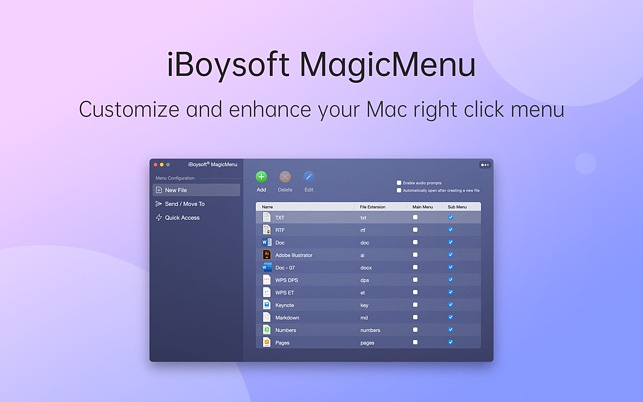
I recently saw a recommendation for MagicMenu
from iBoysoft on Reddit and decided to try out the app. According to
my records, it’s the 1663rd app I have purchased from Apple, and it is
the first one that I have ever requested a refund on. The app actually
works as described, but the information on its free trial and cost of a
yearly subscription was wrong. As soon as I installed the app, I
received a message that the free trial was expired. I’ve never installed
it before, so it wasn’t a case of previously using it. When I decided to
purchase a one-year subscription, I was billed $19.99 rather than the
$9.99 it clearly states as the price in the product description on the
app store.
The app is designed to add functionality to the right-click context menu in Finder. It only works in Finder and nowhere else. It adds the following functions.
- Add a shortcut to create a new file
- Add a folder shortcut to Copy To
- Add a shortcut to Quick Access to an Item
- Quickly move or send files to a certain location
- Completely uninstall unwanted applications
- Find duplicate files and clean up
- Detect similar photos and clean up
- Find junk files and clean up
- Compress files to archive them
Almost all of these actions are found in my preferred file
manager, Path Finder or in
single purpose utilities like App Cleaner, the native
Photos app, Duplicate
Detective and Keka. Other
Finder replacements, like Commander
One offer custom right-click menus as well. If you just want right
click actions in the finder, Qmenu
is only $.99, and 2menu
is $2.99, although both are from Chinese developers if that gives you
pause.
I don’t ordinarily write negative reviews but there were just too many red flags on this app and not enough value for something with a relatively high subscription price.
What Is Your ALT+TAB Solution on Your Mac?

In Windows, when you press the ALT+TAB key combination, you are presented with all of the open windows on your machine, and you can cycle through them by repeatedly pressing the tab key. On a Mac, the equivalent, COMMAND+TAB functions as an application switcher, not a window switcher. No matter how many windows your apps have open, they only show up once on the resulting display. The free and open-source Mac utility, AltTab, offers a solution to this lack of functionality. It offers a highly customizable way to customize your experience, mimicking what Windows does and more:
- Switch focus to any window
- Minimize, close, full screen any window
- Hide, quit any app
- Customize AltTab appearance (e.g. show app badges, Space numbers, increase icon, thumbnail, title size, etc)
- Custom trigger shortcuts with almost any key
- Blacklist apps you don't want to list or trigger AltTab from
- Dark Mode
- Drag-and-drop things on top of window thumbnails
I don’t really care about having the Windows experience, but I want more than what macOS offers natively, so I use the Application switch built in to Keyboard Maestro, which allows me to have not only open apps appear when I press COMMAND+TAB, but also my most frequently used apps. I use this in combination with Mission Control Plus which allows me to combine the built in Mission Control feature with the ability to close apps. Keyboard Maestro offers the following shortcuts:
- Press "q" to mark (or unmark) an application to be quit.
- Press "k" twice to mark an application to be force quit.
- Press "s" or "h" to mark (or unmark) an application to be hidden.
- Press "l" or "z" to mark (or unmark) an application to be launched.
- Press "a" to hide (or show) "always included" applications. Press "e" to show (or hide) "always ignored" applications.
- Press "c" to select the current application.
- Press "f" to select the Finder.
- Press "d" to switch directly to the current app and hide other applications.
Other keyboard driven application switchers include:
HyperSwitch
WindowSwitcher
Switch
Witch
Contexts
Applite - An App Store for Homebrew

Applite is a free application manager using a graphical user interface for apps installed using the CLI Homebrew package manager. Applite allows you to download, manage and update your Homebrew installed apps, even the ones you installed prior to using Applite. It has a clean and simple user interface and is designed for non-technical users. It is free and open source. There are no trackers.
Every application in the Homebrew Catalog is available through Applite. When you launch an app downloaded with Applite, the built in Mac security apps, Gatekeeper and Xprotect will examine it to make sure it is safe to run. Most of the apps in the homebrew catalog are notarized but not all of them are sandboxed, meaning that some may run with elevated privileges. Be careful when downloading applications that few others have downloaded.
You can use your existing version of Homebrew or you can install a separate version just to use with Applite.
The following categories of apps are available:
- Browsers
- Communication
- Productivity
- Office Tools
- Menu Bar
- Utilities
- Creative Tools
- Media
- Developer Tools
- IDE Tools
- Terminals
- Virtualization
- Gaming
- VPN
- Password Managers
EtreCheckPro, System Report on Steroids

EtreCheckPro is an app that displays important system configuration details and allows users to copy that information for analyzation and use elsewhere. It helps identify and address system issues by generating detailed reports after analyzing the system’s performance. It is often requested by experts among Apple Support Communities to help diagnose issues for people requesting help. EtreCheck automatically removes any personally identifiable information from the output.
EtreCheck will automatically alert you to serious problems like adware, insufficient RAM, or a failing hard drive.
Using the program is simple. At startup, it asks you to choose a problem from a list or you can choose “just checking”. Then you click the start button and wait a few minutes while the program runs a scan. When it’s complete, information is provided in the following categories.
Major Issues - Anything requiring immediate
attention
Minor Issues - Anything that could
potentially negatively affect performance
Hardware
- Includes computer, RAM, processor, battery (includes cycle
count and percentage available) and video
System -
Informations on your most recent notifications from apps with
notifications enabled, virtual memory, diagnostics performed in the last
60 days with links to the logs containing the reports
Storage - Information on every partition describing
what it is used for, an option to scan your HD for a usage report,
Details on your Time Machine backups to include snapshots on your local
HD
Network - Detailed info on every network
interface, information on enabled sharing services, a section on Top
Processes Snapshot by Network Use listing the top five
Security - Lists status of built in tools like
Gatekeeper, notes if you are running AV software, lists all enabled
proxies and sharing services. Gives detailed info on all unsigned files
to include unsigned launchd files, unsigned running apps, unsigned login
items and total unsigned apps installed.
Software
- Information on System Extensions, Kernel Extensions, System Launch
Daemons, System Launch Agents, Launch Daemons, Launch Agents, User
Launch Agents, User Login Items, Applications
Performance - Detailed reports on CPU usage, memory us and energy use
Report - a plain text report that can be emailed or posted in a tech support forum
The program to run the report is free.
There is an in-app purchase ($17.99 for up to six machines) to upgrade
the program for people who want the following features:
1. See
computer-generated Solutions - for people who don’t want to post
anything on the internet
2. View detailed results and supporting
information about hardware, operating system, storage, networking,
software, and performance
3. Dive deep into analytics
4.
Compare your computer and your report to others
The program is available here.
(Note: There is an anonymous and poorly written document floating around the Internet purporting that EtreCheckPro is malware. The EtreCheckPro developer says the article was written by a long-time stalker of his engaged in serial harassment. I believe him but use your own judgment.)
Dropover, Best in Class

There is no shortage of shelf apps for the Mac. With popular apps like Yoink, Unclutter and Dropzone in the mix, Dropover Pro, a $5.99 app in the App Store still manages to rise to the top based on price, usability and popularity. Its premise is simple, grab any content type from files, including folders, documents, images, URL’s, text snippets to even web images from your browser with your cursor, shake your mouse and a shelf appears on the screen where you can park the item while you make your next move. You can also designate folders to automatically create a shelf whenever a file is added, a feature I use with my downloads folder.
Dropover is integrated with multiple cloud services. You can move items from a shelf to iCloud, Dropbox, Google Drive, AWS, OneDrive and Imgur and instantly receive a shareable link.
If you are gathering files from various locations, you can have multiple shelfs open at once. Each shelf has a quick action menu that allow you to use the share sheet or native menu to send the file by email, Airdrop or Messages. Other file operations like image resizing, PDF stitching and text extraction are also available.
To differentiate shelfs, you can give them custom names and colors. Shelfs can be docked to the side of the display and temporarily hidden until you need them. You can reopen your last 10 shelfs if you need to reuse them. Items on the shelf can take advantage of Quicklook and you can add to a shelf from the clipboard. The developer has also added Shortcut and Widget support to the app. There are keyboard shortcuts available to create and use shelfs with using the mouse. There are even Raycast and Alfred integrations.
Enhance Apple Shortcuts with These Apps
When I leave work on the days my wife works from a home, I just
press an icon on my phone that sends her a text to let her know I’m
leaving and approximately what time I will be home. In the morning, I
start a daily note in Obsidian and with a couple of clicks a weather
forecast and my daily appointments get added. When I’m ready to begin
working on a certain type of project at work, I just select an item from
a dropdown menu and all the apps I need for the project open up. All of
these tasks and dozens more are accomplished with the help of Apple’s
Shortcuts app, a built-in feature on the current versions of macOS an
iOS.
To enhance your shortcut experience, there are a few apps you can install that add capabilities to the native functionality.
- Adds functionality for Audio transcriptions, Bluetooth, Color, Data,
Device functionality, Dictionary, File Management, Formatting, Images,
Lists, Location, Math, Music, Numbers, Text, URLs, Video and much
more.

Toolbox
Pro - Adds actions for Audio, Calendar, Contacts, Date & Time,
Dictionaries, Files, Health, Images, Location, Math, Media, Reminders,
System Actions, Text and more
Data
Jar - Lets you persist key value pairs inside the app Mine holds
information on my App wish list, Coffee habits and snippets to use in
other shortcuts.
- Use your Mac to design automations that can be triggered at certain times of day or by the location of associated iOS devices. Most useful for Homekit devices and qualified notification settings.
Actions
for Obsidian - Adds missing functionality to Shortcuts that allow
you to do things like import content from the web, import from your
calendars and contacts, integrate health data with notes and more
To find shortcuts that may enhance your workflow, check:
Routine Hub
Matthew Cassinelli
Shortcuts Gallery
Seasons Streaming Companion

For many, the desire to watch all of the latest shows on streaming channels is complicated by the expense of multiple subscriptions. It seems like every month one or more of the channels I subscribe to is raising their price or instituting advertising that I have to pay to opt out of. The smartest strategy to cope with this is to only have active subscriptions to the channels you’re going to be watching during a given period. With channels renewing on different days and some programs being released once a week vs. others being dropped all at once, it can be difficult to map out a strategy that makes sense, but as we used to say in the olden days, there’s an app for that.
Seasons, released in April 2024 walks you through a setup process that has you adding shows from your various watchlists, then adding your channel subscriptions along with their cost and renewal dates. It will tell you how much you are spending per day for your current subscriptions. It will also calculate for you when you should unsubscribe and resubscribe from various channels to maximize your entertainment dollar. You can add both current and upcoming shows as well as movies. Unfortunately, it does not import watchlists, so you will have to add everything manually. On the flip side, you don’t have to use other apps to add shows and Seasons has its own recommendation algorithm based on your interests and user ratings.
Currently, Seasons has a lifetime license available for $3.99 on the app store.
A Privacy and Security Toolkit

In the modern age, it takes a real strategy to protect yourself
from invasive mega-corporations who want to track you, bad actors on the
malware front and in your face non-stop advertising. Whatever tools you
choose have to balance with usability because we all have work we have
to get done.
Nord VPN
My first level of protection starts with my VPN choice, Nord. I run Nord on all my devices, Macs, iPhones, iPads and Apple TV. I don’t have a compatible router, but it can be installed on ones that are. Nord has many security features including a malicious URL blocker, web tracker blocker, ad blocker, URL trimmer and a DNS filter to block ads and malicious domains before they reach my device.
Before I got a VPN, I used Open DNS, which I can highly recommend for some basic protections (but without the privacy features).
Little Snitch Firewall
Little Snitch from Objective Development is truly the most configurable consumer oriented firewall for the Mac platform. The Little Snitch Network Monitor shows you where your Mac connects to on the Internet. You decide what you want to allow or deny. If an app has no need to access the Internet, you can cut off its access. It’s easy to use and configure and as a bonus, you can download and install preconfigured block lists from several sources to make your computer safe.
Other firewall options are Lulu from Objective-See and Lockdown Privacy Desktop, which is what I install on my Mom’s Mac because it is set it and for get it.
Block-Block for Realtime Protection
BlockBlock
monitors common persistence locations and alerts whenever a
persistent component is added. It alerts you whenever something is
installed and you can decide whether to allow that or block it. It’s a
free product. You can get more features in the paid version of MalwareBytes or use their
free scanner that must be run manually.
uBlock Origin for Browser Based Protection
There are many factors that go into making a selection of what browser to use. I personally use Microsoft Edge for several reasons. I use the uBlock origin multi-spectrum content blocker plugin to block ads, trackers, malicious URLs and more. Among the most security conscious Mac users who don’t need to use a Chromium browser, it is generally accepted that Firefox with uBlock Origin provides the best experience. Upcoming changes in Chromium browser plugin specifications, known as Manifest 3, may weaken the effectiveness of uBlock Origin on Chrome and Edge.
These products all work together to provide as safe an environment as I feel I can craft on my Mac. If you have ideas for improvement, please contact me.