
Mac Tools Consolidates Your Utility Bloat — With One Catch
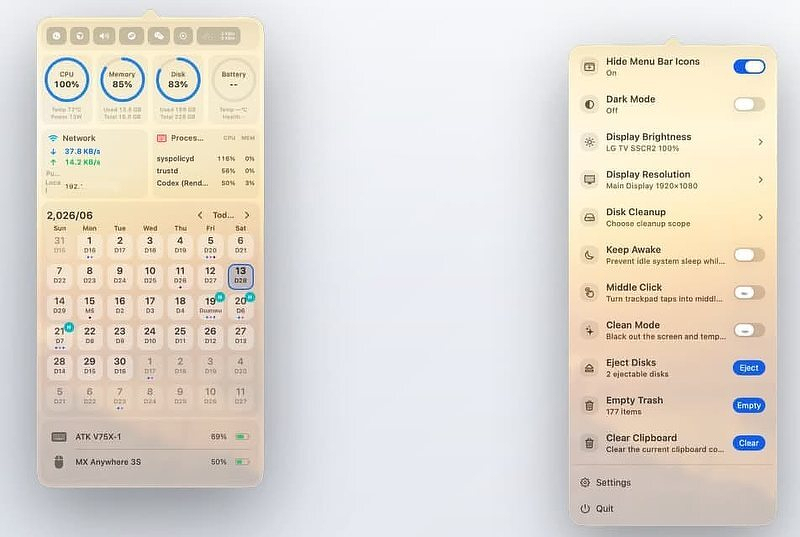
Apple, in its infinite wisdom, buries a great many popular system controls three layers deep in Settings, or worse, leaves them accessible only via the command line. Luckily, we have a community of indie developers who are pretty good at surfacing that stuff, building an app around it, and selling it for $5. An app for brightness. An app for the notch. An app to keep the Mac awake. An app to mute the mic. Then one day your menu bar has 40 icons in it and your login items are out of control.
There's a relatively new, free and open-source app that takes the opposite approach. Currently sporting over 500 GitHub stars, Mac Tools folds more than 40 of those functions into a single menu bar icon. It's built natively in SwiftUI and AppKit; the functions run on native Mac architecture, not scripts. Brightness goes through CoreDisplay, audio through CoreAudio, and disk cleanup runs path verification before it deletes anything. That last one matters: a cleanup tool that checks its work before emptying folders is rarer than it should be.
Check out the Mac Tools website. Mac Tools is available through Homebrew:
brew tap ggbond268/mactools
brew install --cask mactools
What It Does
The features break down into five groups. You enable the plugins for what you want and leave the rest turned off.
Display Control -- resolution switching per monitor, DDC/CI brightness for external displays, True Tone, dark mode, Night Shift, display sleep, prevent sleep, notch hiding, and menu bar icon hiding. This group alone covers what most people buy three or four separate utilities to do.
System Operations -- Stage Manager toggle, system and microphone mute, disk cleanup, Xcode cleanup, eject all disks, empty trash, clear clipboard, lock screen, batch quit apps, and a fix for the "app is damaged and can't be opened" error, which is really just quarantine flag removal with a file picker instead of an xattr command.
Efficiency Tools -- three-finger middle click on the trackpad, a cleaning mode that blacks out the screen and locks input so you can wipe the keyboard, IP lookup, translation, global app hotkeys, a full-screen Launchpad replacement, Finder right-click enhancements, and a zsh config editor.
Monitoring Panel -- CPU, GPU, memory, disk, network, and battery with one-hour history curves; keyboard, mouse, and app usage statistics; battery levels for the Mac plus Bluetooth peripherals and AirPods; fan control; and a charge limiter that defaults to 80 percent.
Personalization -- custom menu bar icons including GIF and MP4 animations, Launchpad appearance controls, 11 languages, and a plugin marketplace.
The plugin architecture is what keeps this from becoming bloatware. Everything can be enabled, hidden, or reordered, so the panel only shows what you actually use.
What It Replaces
The point of Mac Tools is consolidation, not feature-for-feature parity with every indie tool it overlaps. Lunar is still the king of independent monitor control, but if you just need brightness adjustment, Mac Tools handles it. If Amphetamine is only in your Dock to stop the Mac from sleeping, Mac Tools does that too. Across a whole set of single-purpose categories, it's a credible replacement for:
- a notch hider
- a mic mute utility
- an eject-all tool
- Itsycal-style calendar duty
- a Stats-style monitor
- a fan controller
- a charge limiter
- an app usage tracker
The Catch and a Reality Check
This is a relatively new app. After it appeared on GitHubDaily and in a Medium article, its popularity spiked fast. The developer's true identity is unknown; "ggbond268" is a pseudonym, and the project came out of the Chinese Mac community. The README is in Chinese, though the app itself is localized into English and ten other languages. That's not disqualifying on its own -- I run Chinese-built apps like Qspace regularly -- but it's the kind of context you want before you grant an app broad system access, not after.
And several of these features do ask for broad access. Fan control installs a helper with admin rights. Disk cleanup deletes files. The middle-click feature uses an event tap. Quarantine removal is the kind of thing you want done carefully, not casually. The code being open and the app being native counts for a lot -- that's the whole argument for shipping as a public repo instead of a black box. What it doesn't have yet is a public security audit. Worth knowing before you install, not a reason to skip it outright.
Is This For You?
If you're comfortable installing from a Homebrew tap, you like open source, and your menu bar currently hosts a small orchestra of single-purpose utilities, Mac Tools is an easy experiment. It's free, it's light, and the plugin design means you can turn on three features and ignore the rest.
If you'd rather pay for a mature tool with a support address and years of releases behind it, or handing admin rights to a young, pseudonymous project makes you itch, stick with the battle-tested standalones for now and check back in six months. Promising and early -- both are true at once.