
RAD Weather for macOS Shows You Where the Forecasts Disagree
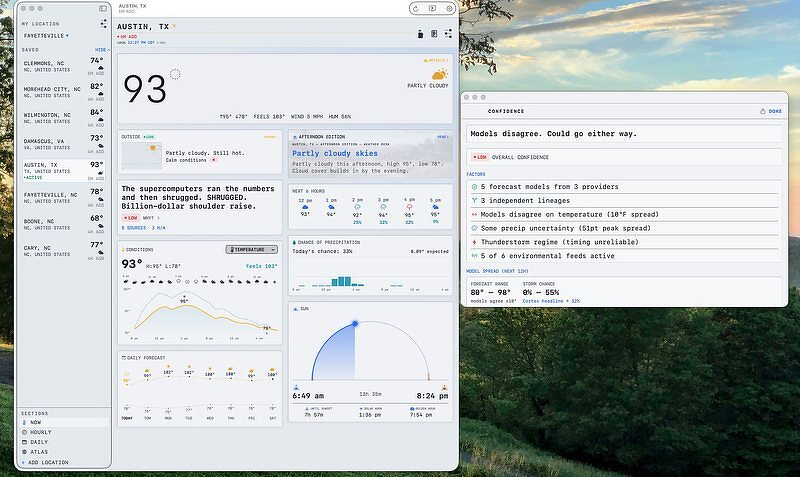
TL;DR: RAD Weather pulls forecasts from four services and shows you where they disagree instead of averaging the disagreement away. Free, with RAD Ultra at $1.99 a month, $19.99 a year, or $99.99 once, plus a MultiPass tier at $2.99 monthly or $29.99 annual. The Mac build is a real Mac app, the subscription is justified by per-forecast data costs, and there is no radar. RAD TV shipped in 7.6.7 and an Apple TV version is announced.
RAD Weather's Unique Feature
Years of obsessive cycling naturally paired with years of obsessive weather forecast following. Although none of us can do anything about the weather (except to move to a new city), I felt compelled to track temperature, wind speed and rain forecasts several times a day whenever I had a big ride scheduled. I collected weather apps and went into mourning when Dark Sky ceased to exist.
Most weather apps are someone's best guess, presented as a fact. Someone, or some algorithm, took several disagreeing weather services, picked one and discarded the rest. RAD Weather doesn't discard anything, and that's the product.
What R.A.D. Cortex Is Doing Under the Hood
The engine has a name now, R.A.D. Cortex, and its job is to pull forecasts from the National Weather Service, Open-Meteo, Environment and Climate Change Canada, and Apple WeatherKit, then compare them. Where the models converge, you get a high confidence rating. Where they split, the app shows you the spread instead of hiding it behind an average. The developer added lead-time-aware weighting in an earlier release, so regional high-resolution models carry more weight for the next few hours while ECMWF gets priority for the extended outlook. That's a reasonable thing to do, and it's the kind of decision most weather apps make silently, if they make it at all.
Five Things That Matter in the Mac Version
- It's a real Mac app. Many weather apps just port their iPad version to Apple silicon and call it a day. CARROT Weather has a standalone Mac app, but it hasn't been updated since 2023. With RAD Weather, you also get Mac widgets, a menu bar item, and iCloud sync with the iPhone and Watch versions. Requires macOS 15.0 or later.
- The multi-source view is the killer feature. Detail cards break out temperature, wind, precipitation, UV, pressure, humidity, visibility, dew point, pollen, air quality and convective risk, and the confidence deep-dive shows you which models fed the number. It's my favorite part of the app and I never stop fiddling with it.
- RAD Atlas is an interactive 3D globe with live conditions, which sounds like a toy and mostly is, but it's a fast way to check what's happening somewhere you care about without typing a city name.
- Brutality Levels adjust the tone of the written briefings across five settings, from professional to unhinged. Similar to CARROT, which is funny, RAD Weather is also funny. Since humor is subjective, I'm not making a call there. If you want a weather app that doesn't talk to you, turn it to professional and it stops.
- The privacy declaration is clean. Rozzi Labs declares no data collected beyond location, not linked to your identity, used only to fetch a forecast, with no tracking or analytics. That's about as good as a networked weather app gets.
What the Subscription Pays For
RAD Weather is free. RAD Ultra is $1.99 a month, $19.99 a year, or $99.99 once, and Ultra is what unlocks the Atlas globe, the extra saved locations, the Savage and Unhinged tone settings, full detail cards and advanced notifications. There's also RAD MultiPass at $2.99 a month or $29.99 a year, which extends across the other Rozzi Labs apps and the radweather.cloud web service.
No one likes an unjustified subscription. I've done my best recently to avoid writing about subscription apps altogether. Weather prediction apps are the exception. Every forecast this app pulls costs the developer money, and he's pulling from four services instead of one; widget and Watch complication refreshes multiply that cost across every user, every day, forever. A one-time purchase doesn't fund a bill that arrives monthly for the life of the app. The developer of CARROT Weather has been making the same argument for years, and he's right.
The whole high-end category runs this way. CARROT Weather is free to download with Premium at $4.99 a month or $19.99 a year and Premium Ultra at $9.99 a month or $39.99 a year. Mercury Weather is free with a subscription at $2.99 a month or $14.99 a year. Hello Weather limits you to a single forecaster and no widgets until you subscribe. Against all that, RAD Weather is one of only two apps here that will sell you a permanent copy. RAD Ultra Lifetime is $99.99, which works out to five years of the annual subscription; Mercury's lifetime is $59.99, or four years of its annual. Neither is a bargain on day one. CARROT has no lifetime tier at any price, which is the part I mind.
Current Shortcomings
RAD Weather doesn't currently offer radar maps, so if that's how you make decisions during rough times, you'll need something else. There are other weather apps with a long and proven track record. Its App Store rating is high, but the number of ratings behind it is still small enough that I wouldn't lean on it.
Other Weather Apps
The alternatives, briefly. CARROT Weather, to which I have subscribed for years, is the incumbent in personality weather and has the better radar and map layer story; note that the standalone Mac app is $14.99 and hasn't been updated since May 2023, so on the Mac you want the iPhone and iPad version instead. Mercury Weather, another app I've used in the past, is the choice if you want calm and legible rather than loud. Apple Weather is free, built in, and fine for the basics. DatWeatherDoe is free, open source under Apache 2.0, installs with brew install --cask datweatherdoe, and puts conditions in your menu bar; you supply your own WeatherAPI key.
Unless otherwise noted, the alternate apps mentioned above are based on research and not individual testing.
Is It for You?
Yes, if you want accuracy and detail from a weather app and you're willing to pay for it. The multiplatform coverage helps too, especially with the recently released full screen RAD TV mode for the Mac and an Apple TV app on the way.
No, if you want radar, or your needs are minimal. For design nerds, the faux terminal presentation may be off-putting. Not being a design nerd, I'm fine with it.