
Lore: A Free App for YouTubeVideo Downloading, also Builds YouTube Playlists Without Signing In
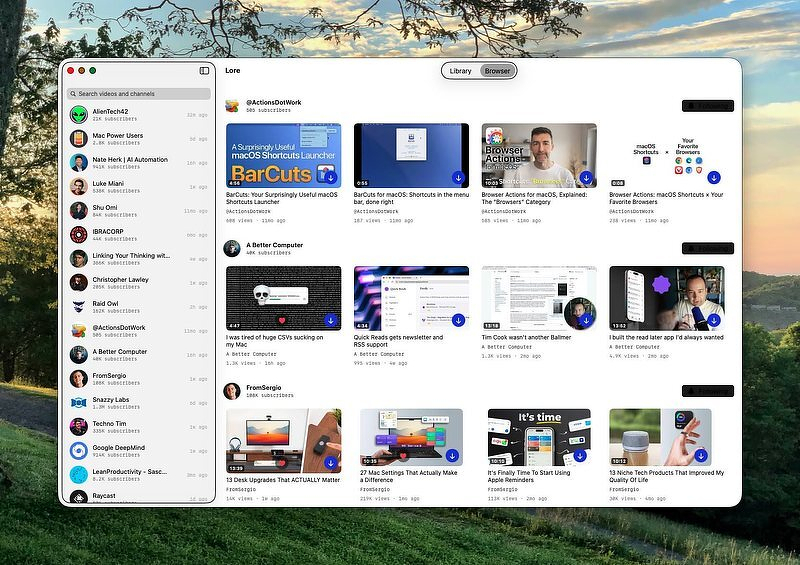
TL;DR: Lore is a free Mac app that follows YouTube channels over plain RSS, no algorithm, no Google account, then archives what you keep as a permanent offline file with transcript search, highlights, and SponsorBlock built in. The site's source-code link 404s, so don't take open source on faith. Alternatives for readers who want a lighter touch: FreeTube (free, open source, no algorithm, no download) and Grayjay Desktop ($9.99 one time, aggregates YouTube with other platforms).
Blog title: Lore Solves a Problem Neither of My Last Two Posts Could
Reddit title: Lore: The Mac App That Skips YouTube's Algorithm and Keeps the Video Even After YouTube Doesn't
Lore Solves a Problem Neither of My Last Two Posts Could
When you find a video you want to archive, any app that merely organizes links isn't an archive at all. It's a bookmark service. There's a use for that, but if you need a quality local copy of the information, you need a proven download and catalog app. After evaluating the top contenders, I chose Lore, a native Mac app built by a solo developer, Adrian Galilea. It solves two of YouTube's problems in one place: it follows channels without an algorithm, and it keeps what you save even after YouTube stops hosting it.
Five features for power users
- The built-in browser follows channels over plain RSS. No algorithm, no home feed, no recommendations. No Google account required.
- Web ingest archives any link as one self-contained offline file, subtitles, chapters, and metadata baked in. This needs
yt-dlpandffmpeginstalled separately; Lore will tell you which one is missing if you're not set up, but it doesn't install them for you. Set them up yourself ahead of time to avoid the interruption. - Transcript search runs across your entire library, powered by SQLite full-text search. Find the video where someone actually said the thing, instead of scrolling ten channels trying to remember which one it was.
- Highlights let you mark a moment with a keystroke, edit the clip against the transcript, and export it as a standalone video file.
- SponsorBlock auto-skip, chapter markers with hover-frame previews, and full keyboard-driven navigation, all of it working offline once a video is archived, plus Spotlight, Shortcuts, and Siri actions to play, pause, skip, or archive a link without opening the app.
It's free. No purchase, no subscription, no App Store listing; support is optional through Ko-fi or GitHub Sponsors. Development has been unusually aggressive: 28 versioned releases between June 11 and July 6, 2026, most of them driven by direct user feedback.
Although the landing page on Lore's website has a link to view the source code, it 404s, pointing at a GitHub page that no longer exists. I'm not sure what that portends, but be aware of it before you install.
The feature that shall not be added
The developer has also publicly turned down adding related-content recommendations, writing that it feels at odds with the reason people use the app in the first place, and that it won't ship unless it can be done without becoming distracting. That's a stronger commitment than a marketing line; it's a maintainer talking themselves out of a feature that would have been easy to justify.
Added to my toolbox
I've been burned by a video disappearing, and I just don't trust YouTube to keep hosting things I care about. If you're on macOS 26 with Homebrew already comfortable in your workflow, Lore does more in one app than anything I've discovered while writing this series. The transcript search alone is worth the price of admission, and the price of admission is nothing.
Alternatives
FreeTube, an app I have used and recommended for years, does the algorithm half of this, and it can download individual videos too, but it stops there. Free, open source, and already reviewed here on the blog. It builds a local, unranked feed from your subscriptions using its own extractor, no Invidious required, and has been shipping steadily through 2026. The download button saves a file to disk with a choice of format and quality; what it doesn't have is anywhere to manage those files afterward. No downloads tab, no in-app library, no transcript search. You get the file; Lore gets you the file plus a permanent, searchable home for it.
Grayjay Desktop is worth a mention for a different reason: it aggregates YouTube alongside other platforms, Twitch, Odysee, PeerTube, into a single feed with no algorithm by default. One-time purchase, $9.99, from the FUTO team. Until recently, Mac build currently needed a manual terminal command to get past Gatekeeper, but the current version does not.
Unless otherwise noted, anything mentioned above beyond Lore is based on research, not testing on my end.
Who this isn't for
If you're not on macOS 26 yet, this is off the table until you are. If you don't want to install yt-dlp and ffmpeg separately, the web-ingest half of the app won't work for you out of the box. And if open-source code matters to your trust in a tool, Lore doesn't currently back up its own claim to it.